
We've made a big round of improvements to the RFQ experience. Whether you're creating requests, quoting, or choosing winners — it's all faster and more flexible now.
TL;DR
- Cherry-picking — take best quote per line
- Copy RFQs — create new requests in seconds
- Compare currencies — no FX math
-
Faster setup — smarter defaults
-
Easier decisions — improved quote comparison
Cherry-picking: choose the best quotes per line
You can now accept individual line items instead of full quotes.
This means:
-
Mix prices across participants
-
Quote only the lines you want
-
Increase competition per line item
-
Build the optimal deal
Choose from three quote acceptance policies:
- Full quotes only — participants must quote all items, and you accept the full quote as-is
- Partial quotes allowed — participants can quote selected items, but you accept the quote as submitted
- Cherry-picking allowed — participants can quote selected items, and you can accept individual line items from their quote

Faster to create
COPY FROM PREVIOUS RFQ
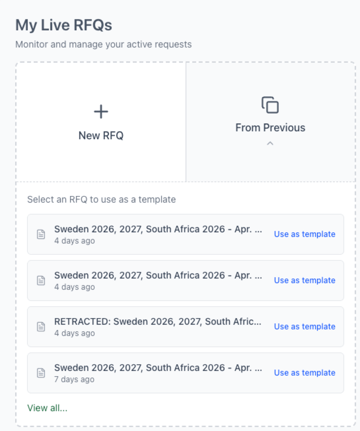
Your RFQ Home page now shows your recent drafts and a new From Previous button.Pick any past RFQ and create a copy in one click — all your line items, settings, and participants carry over. Just adjust what's changed and publish.
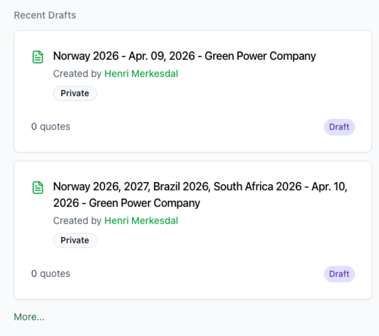
CONTINUE FROM DRAFT
We save your drafts for you, and the last ones you now find directly on the RFQ Home screen so you can quickly continue your work.
SMARTER ORIGIN SEARCH
All origins available by default in one convenient search function.
Recently used origins now appear first – faster RFQ setup

Easier decisions
REDESIGNED DEADLINES
Setting up timing used to require some mental math. Now you get a visual timeline showing exactly when your RFQ starts, when quotes are flexible, when they lock (if using Firm mode), and when it all closes. A plain-language summary keeps it crystal clear, and warnings flag any issues before you publish.

EASIER TO COMPARE AND DECIDE
New quote summary Before submitting, participants now see a full review of their quote — every line item with included/not-quoted status, unit prices, line totals, and a running total. They can also save drafts and come back later.
CURRENCY DISPLAY HELPER
Working across markets with mixed currencies? The new display helper lets you preview any quote in a different currency for easy comparison — without changing the actual quoted values. Toggle between original currencies and your preferred view whenever you need to.

INTEGRATED QUOTE COMPARISON
All quotes and line items now appear in one unified view.
PRE PUBLISH CHECKLIST
The RFQ summary panel now works as a pre-flight checklist. Before publishing, you'll see your status, deadline summary, and quote policy at a glance. If anything needs fixing — like a deadline that's already passed — you'll get a clear warning with a direct link to the step that needs your attention.

Ready to try it out?
🚀 Head to your RFQ page and create your next request.
April 13, 2026